01
Alert
An authorised coordinator raises an alert for the site and shares instructions with the relevant teams.
Horizon site
Evacuation in progressAssembly point A


Coordination starts before the emergency
Instructions to share. Teams to mobilise. A situation to understand. Evalert brings alerts and responses together to help your coordinators manage a site evacuation.
Prepare today. Coordinate better tomorrow.
Illustrative scene · Generated imageUseful information, in one place
The alarm gives the signal. Employee responses provide another layer of information: who has read the instructions, who reports having evacuated and who reports a difficulty.
Solution project · Scope to define with your organisation
Illustrative interface · 24 fictional people
Explore the screens that support each role, from receiving instructions to reviewing responses.
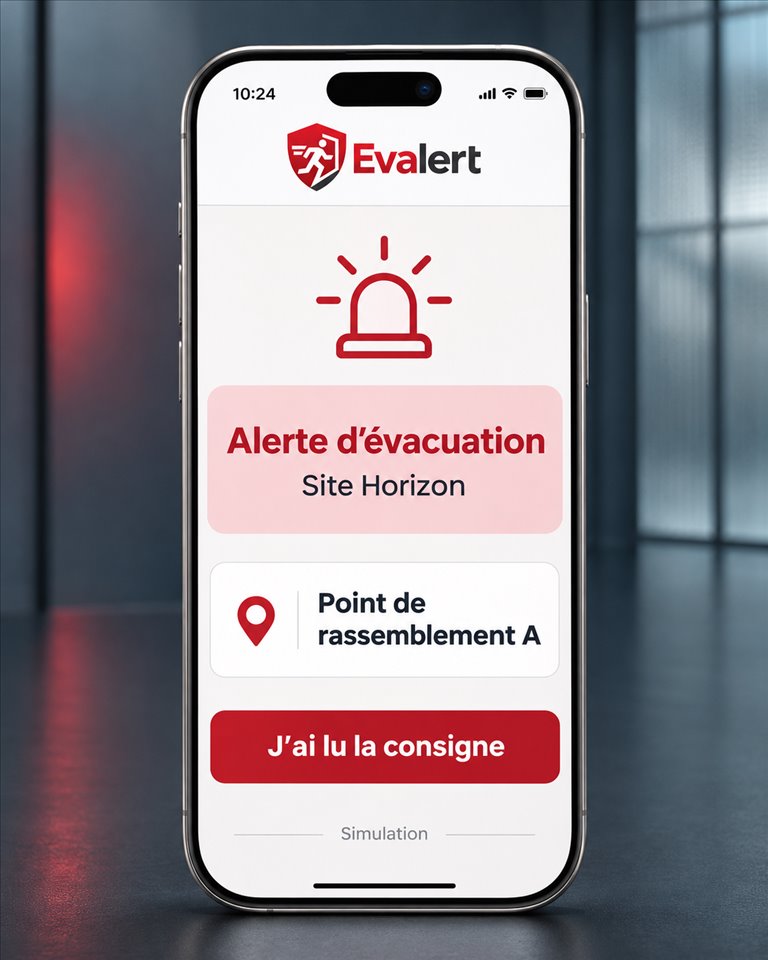
Staff see the instructions and assembly point for their site.
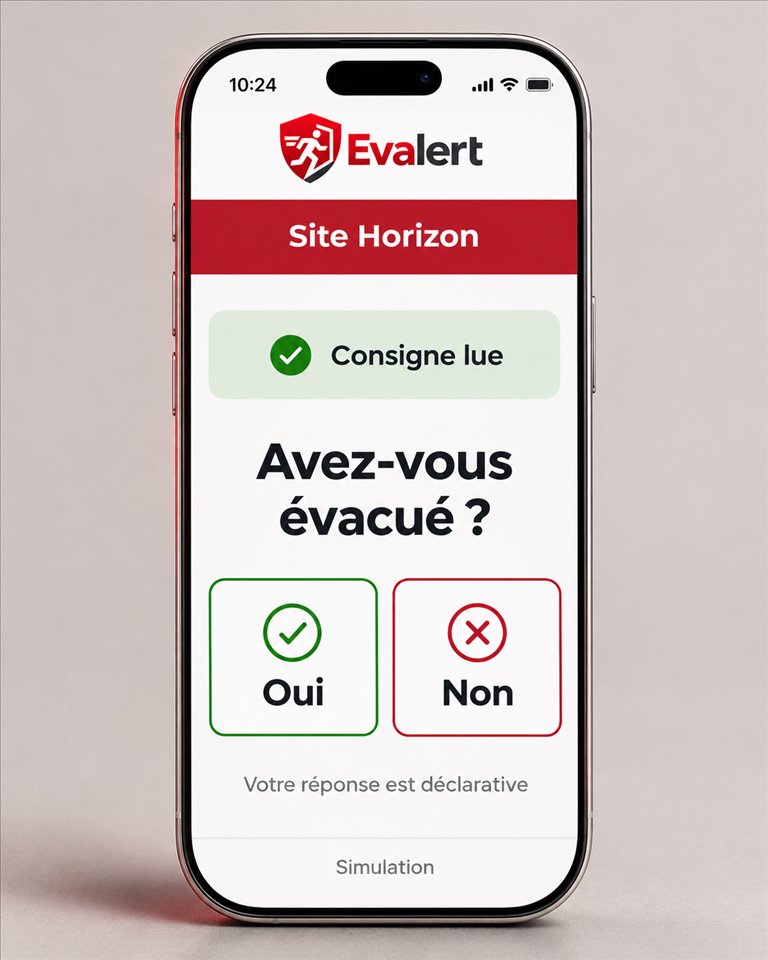
After reading the instructions, staff indicate whether they have evacuated.
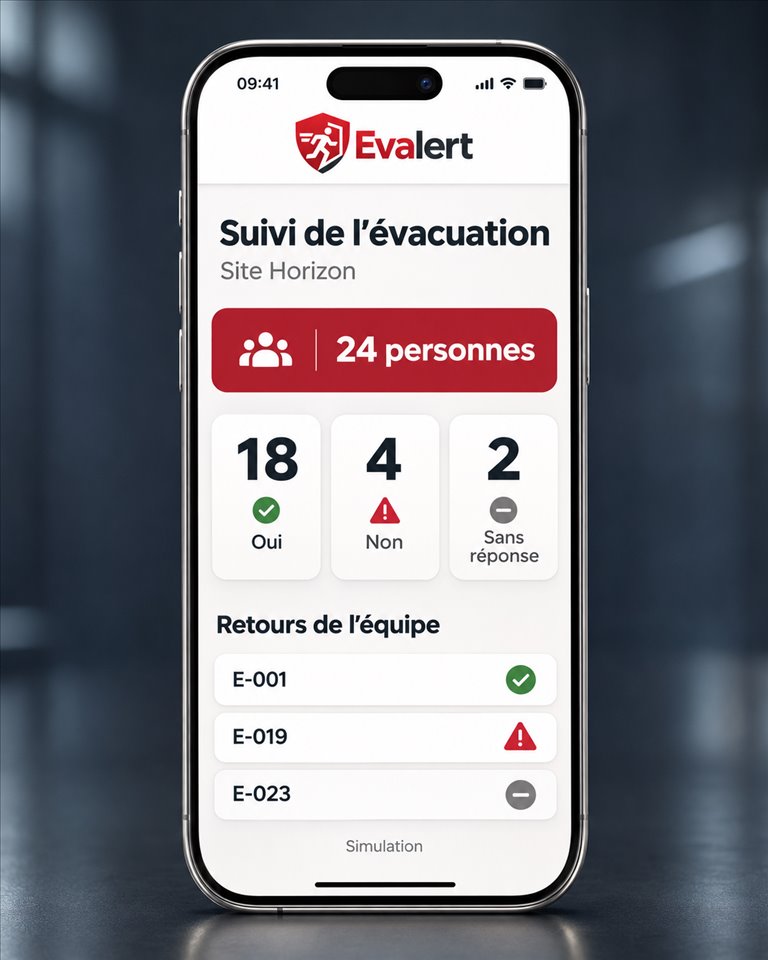
The coordinator can see who responded Yes or No and who has yet to reply.
Generated mockups · French interface · Fictional data
From an alert to a clearer picture
Once instructions have been shared, responses matter. Evalert aims to bring them together to help you understand the situation as it unfolds.

Prepare for the moment everything accelerates
Buildings, teams, working hours and assembly points: every site has its own constraints. Defining the alert journey and roles in advance helps share the right instructions when needed.
Define the sites, the relevant teams and the instructions.
Bring acknowledgements, responses and reported difficulties together.
Close the alert according to your procedure and identify improvements.
A simple journey, clearly defined roles
An authorised coordinator raises an alert for the site and shares instructions with the relevant teams.
Assembly point A
Each employee acknowledges the alert, then states whether they have evacuated, adding a reason if needed.
Updated responses help identify reported difficulties and people who have not responded.
Product illustration — fictional data
Learn by exploringExplore the concept in action.Open the demonstrationTwo complementary experiences
Raise a site alert, review responses and reasons, then close the alert when your procedure calls for it.
Product illustration — fictional data
An alert addressed to employees assigned to the relevant site.
An explicit confirmation, distinct from a notification being sent.
A Yes or No evacuation statement, with a reason if needed.
Responses brought together for a clearer picture.
A planned aid, subject to permissions and technical conditions.
Two roles, with French, English and German planned on iOS and Android.
Different settings, a shared need
Potential uses in Switzerland and France, to be defined around the needs of each site.
Bring together responses from the teams on site.
Support site-specific procedures.
Give coordinators a clearer overview.
Support coordination with the client organisation.
Potential use cases, not references to existing customers.
From your site to your project
Tell us about your organisation. We can discuss your alert and evacuation needs, consider an on-site meeting and define the information needed for a proposal.
Request a quoteYour teams, buildings and current organisation.
Use cases, constraints and whether a site visit would help.
The sites, access and support you need.
A closer look
Evalert is a project for businesses, safety managers, site managers and security companies. Access is reserved for client organisations and their teams.
An authorised coordinator raises an alert for the site to which employees are assigned. An authorised coordinator also closes the alert.
They read the instructions, confirm acknowledgement, then answer Yes or No to “Have you evacuated?”. These are separate confirmations.
A No response can include a reason. The demonstration illustrates fictional difficulties; these reasons do not form an official list of statuses.
It is intended as an aid during an alert, subject to permissions and technical conditions. It is not permanent tracking or guaranteed precise indoor positioning.
The planned scope covers an iOS and Android mobile app in French, English and German. This website offers no public app download.
Scope and team access are defined with your organisation through a subscription or contract. Contact us to prepare that discussion.
No. Evalert is intended as a supplementary coordination tool. It does not replace alarms, site instructions or emergency procedures.
The “Request a demonstration” form prepares your enquiry. Sending is not yet enabled on this preview; this status remains visible in the form.
Evalert
A practical conversation about your organisation, your needs and possible support with Evalert.